

LALAL.AI for Desktop
Bring professional-grade audio separation directly to your computer with the AI-powered desktop app. Enjoy seamless vocal and instrumental removal, musical instrument extraction, and noise canceling.
Latest Release: 2024-06-18
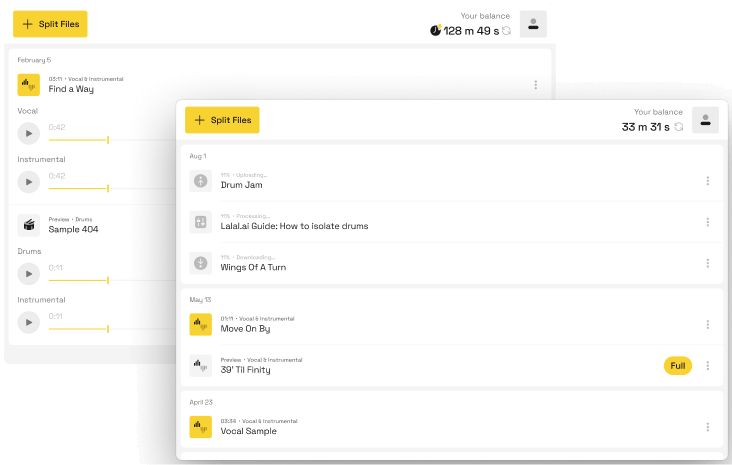
User-Friendly Interface
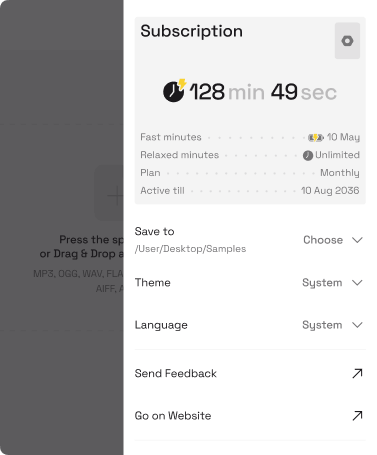
Unlimited Free Stem Previews

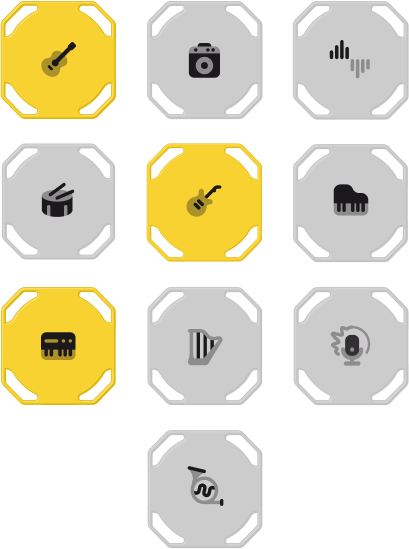
10-Stem Separation Support
High-Quality Audio Output

Track Your Splitting History

Stem Splitting, Simplified On Your Desktop
![]()
Vocal Isolation
Extract or remove vocals using state-of-the-art AI technology. Isolate vocals and instrumental parts with exceptional precision for karaoke, mashups, and other creative works.
![]()
Instrument Extraction
Isolate individual instruments like drums, bass, guitar, and piano from any song. Customize your tracks by extracting specific elements for remixes, edits, and more.
![]()
Noise Reduction
Eliminate unwanted background noise, hiss, or interference from your audio recordings. Simply upload your track and our AI will quickly remove noise, delivering clean audio.
![]()
Batch Processing
Process multiple audio or video files simultaneously to save time. Quickly isolate vocals and instruments or reduce noise across a collection of songs or recordings.
![]()
Flexible File Support
Enjoy a wide range of supported file formats, including WAV, FLAC, MP3, and more. Export the separated tracks in the same format as the original file for further editing or sharing.
![]()
Lossless Audio Quality
Get studio-grade results, preserving every nuance of the original lossless recording. Extract vocals, instruments, and other elements without compromising sound fidelity.


Looking for More?
Download LALAL.AI applications for convenient stem splitting across your mobile and desktop devices. Integrate our powerful AI technology into your site, widget, or service.

Desktop App
Get a dedicated workspace for stem-splitting and noise-canceling tasks. Enjoy batch uploads, previews, and easy file organization on the desktop.
Mobile App
Transform your smartphone into a mobile audio lab. Take the leading stem-splitting technology on the go with our mobile apps for iOS and Android.


Web Widget
Embed our stem separation technology into your website. Offer your users the ability to split audio into multiple stems without leaving your platform.

VST Plugin
Extract vocals, instrumentals, and other audio elements in your favorite DAWs. Access advanced audio processing within your familiar environment.
FAQ
The LALAL.AI desktop app gives you a dedicated workspace for stem splitting and noise reduction tasks. Compared to the web version, it makes it easier to manage and organize your processed files and keeps everything in a single place on your computer. The core functionality and separation quality are the same as the web version.
The main advantages of the desktop app over the browser are local file organization with a configurable output folder, and for Pro subscribers, local processing via Lyra, LALAL.AI's on-device AI model. Local processing works without an internet connection, doesn't upload your audio to the server, and doesn't deduct from your processing minutes.
It depends on the processing mode. By default, the app uses cloud-based processing and requires an internet connection. Pro subscribers can switch to local processing mode powered by Lyra, LALAL.AI's on-device model, which processes audio directly on your device and works fully offline. An internet connection is only needed occasionally for subscription validation.
The desktop app itself is free to download and install. Processing files requires a LALAL.AI account. The free Starter plan includes 10 minutes in the Relaxed Queue and lets you preview results, but downloading the full output requires a paid plan.
Go to the LALAL.AI desktop app page and click the Download button for your operating system. Once the installer is downloaded, run it and follow the setup steps. After installation, open the app and log in with your LALAL.AI account email.
The LALAL.AI desktop app is available for Windows, macOS, and Linux (Ubuntu).
The LALAL.AI desktop app is available for macOS 10.15 or later, Windows 10/11, and Ubuntu 22.04 or later. No specific RAM requirements apply.
For local processing with Lyra, the model runs on standard production hardware and takes advantage of GPU and NPU acceleration where available. For the best experience, keep your operating system and drivers up to date.
Open the app and click the profile icon in the top right corner. In the menu that appears, select Check for Updates.
It depends on the processing mode. With cloud processing, all 10 stems are available: Vocal and Instrumental, Drums, Bass, Electric Guitar, Acoustic Guitar, Piano, Synthesizer, Voice and Noise, String Instruments, and Wind Instruments.
With local processing via Lyra, our on-device model, 7 stems are supported: Vocals, Instrumental, Drums, Bass, Piano, Acoustic Guitar, and Electric Guitar.
Yes, the desktop app supports batch processing. You can select and upload up to 20 audio or video files at the same time.
You can upload files in the following formats:
- Audio: MP3, OGG, WAV, FLAC, AIFF, AAC, M4A.
- Video: AVI, MP4, MKV, MOV, M4V.
Processed files are downloaded in the same format as the original by default.
When using cloud processing, the desktop app has the same stem options and settings as the web version, including Neural Network Selection (Orion, Perseus, Andromeda), Enhanced Processing, De-Echo, and Lead/Back Vocal Separation. Local processing via Lyra, our on-device model, has its own set of stems and does not include cloud-specific settings.
Open the app and click the Log In button in the bottom right corner. Enter your email address and paste the verification code sent to your inbox to complete sign-in.
Yes, you can use the LALAL.AI desktop app on multiple computers. Simply log in to your account on each device.
Note that local processing with Lyra, our on-device model, can be activated on up to three computers simultaneously.
You need a LALAL.AI account to process files. The free Starter plan lets you upload files and preview results, but downloading the full output requires a paid Lite or Pro subscription.
Yes, your LALAL.AI minute balance is tied to your account and is shared across all platforms: the desktop app, mobile apps, and the web version. Note that local processing via Lyra, our on-device model, does not use minutes from your balance.
